
TL;DR
The RTX 5090 and the RTX PRO 6000 Blackwell are built on the same Blackwell architecture and deliver nearly the same memory bandwidth - so per-card generation speed is close. The decisive differences are elsewhere: the 5090 has 32GB of non-ECC GDDR7 and an axial cooler that spikes to 575W; the PRO 6000 has 96GB of ECC GDDR7, comes in blower and passive server variants, and slots into a dense multi-GPU chassis without the thermal and power drama. Here is how they actually differ in practice.
Which one fits you
For models up to 32B on one workstation
RTX 5090
Generation is nearly as fast as on the PRO 6000: the bandwidth is the same, ~1.8 TB/s. The most tokens per euro. Made for development and prototypes.
For 70B-120B models on one card, in production
RTX PRO 6000 Blackwell
96GB of ECC memory: a 70B at Q4 fits with a large context. Passive or blower cooling suits a dense server. ECC keeps long runs safe from silently corrupted results.
For a prototype now and production later
5090 to develop, PRO 6000 to deploy
Start on the cheaper card. Move to PRO 6000 servers once the workload is real.
Same silicon, two different missions
Both cards use NVIDIA's Blackwell generation and the same class of GB202 die on a 512-bit memory bus. That's why their raw memory bandwidth is in the same ballpark (~1.8 TB/s) and, since local LLM generation is memory-bandwidth-bound, their token-generation speed on a model that fits both is close. The 5090 is the consumer flagship; the PRO 6000 is the professional workstation/server card. NVIDIA didn't split them by speed - it split them by capacity, reliability and how they behave inside a machine.
Specs side by side
| RTX 5090 | RTX PRO 6000 Blackwell | |
|---|---|---|
| VRAM | 32GB GDDR7 | 96GB GDDR7 (ECC) |
| Memory bandwidth | ~1.8 TB/s | ~1.8 TB/s |
| Memory bus | 512-bit | 512-bit |
| CUDA cores | ~21,760 | ~24,064 |
| TDP | 575W | 600W (Max-Q variant ~300W) |
| Interface | PCIe 5.0 ×16 | PCIe 5.0 ×16 |
| Cooling | axial (2-slot) | blower / passive (server) |
| ECC memory | No | Yes |
| Largest 4-bit model on one card | ~32B comfortably | ~70B comfortably, ~100B+ possible |
| Price tier | consumer flagship | professional (~3-4×) |
VRAM is the line that actually divides them
On a single card, VRAM decides which models even load. At Q4_K_M (~0.55-0.6 bytes/param plus KV cache):
- RTX 5090 (32GB): a 32B model fits comfortably with generous context. A 70B (~40-43GB of weights) does not fit - only an aggressive, lower-quality IQ3/Q3 quant (~30-34GB) is borderline, with a quality trade-off.
- RTX PRO 6000 (96GB): a 70B at Q4 fits with a large context window to spare. You can push to ~100B-120B-class models at 4-bit, or run a 70B with very long context and a quantized KV cache. On a single card - no multi-GPU split, no tensor-parallel complexity.
This is the whole point of the PRO 6000 for AI: it collapses a dual- or quad-GPU build into one card. If your workload is a 70B in production, one PRO 6000 is simpler, more reliable and easier to cool than 2× 5090 rigged together - and it leaves headroom for context and batching that the 5090 pair doesn't have.
Speed: closer than the price gap suggests
Because both cards share bandwidth in the ~1.8 TB/s range, on a model that fits both (say a 32B at Q4) the difference in tokens/second is modest - the PRO 6000's small core-count lead helps prompt processing more than generation. You are not paying 3-4× for 3-4× the speed. You're paying for capacity, ECC and server-grade behavior. If a 32B is your ceiling and you want maximum tokens-per-euro, the 5090 wins outright.
Cooling and density: why the PRO wins inside a server
This is where first-party build experience matters more than a spec sheet. The 5090's axial "Founders"-style cooler is designed for an open desktop with airflow on all sides. Pack two of them into a rack chassis and the top card starves the bottom one; sustained 575W spikes stress the PSU and the room. The 5090 is superb on a workstation and awkward in a server.
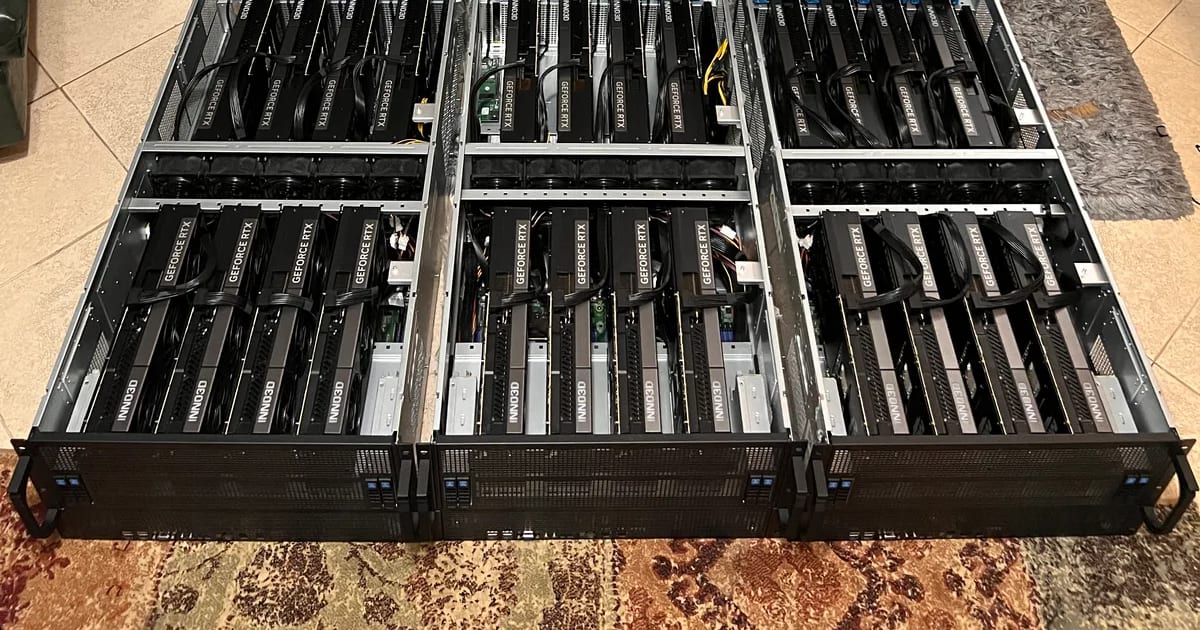
The PRO 6000 is built for the opposite. The blower variant exhausts heat out the back of the case; the passive/server variant has no fan at all and relies on the chassis' front-to-back wall of air - exactly how a 4U GPU server is engineered to cool 4-8 cards in a row. That's why our 8-GPU builds standardize on server-class cards: they're designed to sit shoulder-to-shoulder and run at 100% for weeks. You can read how such machines are designed, assembled and burned in on our GPU & AI infrastructure service.
ECC and reliability
The PRO 6000's memory is ECC - it detects and corrects single-bit errors. On a gaming card a flipped bit is a cosmetic glitch; during a multi-day training run or a production inference service it's a silently corrupted result or a crash. For anything customer-facing or long-running, ECC plus the professional driver branch and warranty is not a luxury - it's the reason the card exists.
When each one makes sense
- Choose the RTX 5090 when: your models top out around 32B, speed and price/performance are the priority, it's a single-GPU workstation or a small local lab, and occasional downtime is acceptable. It's the value king of the Blackwell line for local AI.
- Choose the RTX PRO 6000 when: you need 70B-120B on one card, long context, ECC, a dense multi-GPU server, passive/blower cooling for a rack, or production reliability and warranty. It's the card you build a service on.
A common, sensible split: prototype and develop on a 5090 workstation, then deploy to PRO 6000 servers once the workload is real. If you want to put numbers on that decision, our GPU ROI calculator compares buying either card against renting equivalent cloud compute.
How we build with both
Aura Digital designs machines around both cards to spec, and our build partner assembles and tests them (we can also do it in-house): a single-5090 AI workstation, or a 4U server with multiple PRO 6000s, ECC throughout, redundant power and burn-in under full load before delivery, with a 3-year warranty (5 years as an option) and optional SEV-SNP confidential compute. We size the build to the exact models you'll run, so you don't overpay for VRAM or cooling you won't use.
Conclusion
The RTX 5090 and RTX PRO 6000 Blackwell are not really competitors - they're two answers to two questions. "How fast and cheap can I run models up to 32B?" - the 5090. "How do I run 70B+ reliably, at density, in production?" - the PRO 6000. Same silicon, same bandwidth; the money buys capacity, ECC and server-grade behavior, not raw speed.
Planning a Blackwell build and not sure which card fits your models and budget? Contact us for a free consultation - we'll size a single-GPU workstation or a multi-GPU server around exactly what you'll run.