
Buy an AI server: three configurations for LLMs and training
Which GPU, how much VRAM and which host your model needs depends on model size, context length and the number of concurrent requests. Here are three example configurations from our configurator, with the arithmetic behind them.
Which configuration fits your model
Entry: 4× RTX 5090, 128 GB VRAM
For models up to about 32B at INT4, or several small models side by side
4U-E10G-GENOAX2 with 2× AMD EPYC 9254 and 384 GB of DDR5 ECC
One RTX 5090 with 32 GB holds 7B-13B at FP16 or up to about 32B at INT4, at moderate context. Four cards serve up to four such models, each on its own card. Four GPU slots stay free.
Mid-range: 4× RTX PRO 6000 Blackwell, 384 GB VRAM
For 70B models at INT8, each on its own card
4U-E10G-GENOAX2 with 2× AMD EPYC 9554 and 768 GB of DDR5 ECC
With 96 GB, a single card holds a 70B model at INT8 and still has room for the KV cache. ECC memory protects long runs from silently corrupted results. Four GPU slots stay free.
Large: 8× RTX PRO 6000 Blackwell, 768 GB VRAM
For several 70B services, long contexts and fine-tuning
4U-E10G-GENOAX2 with 2× AMD EPYC 9754 and 1.5 TB of DDR5 ECC
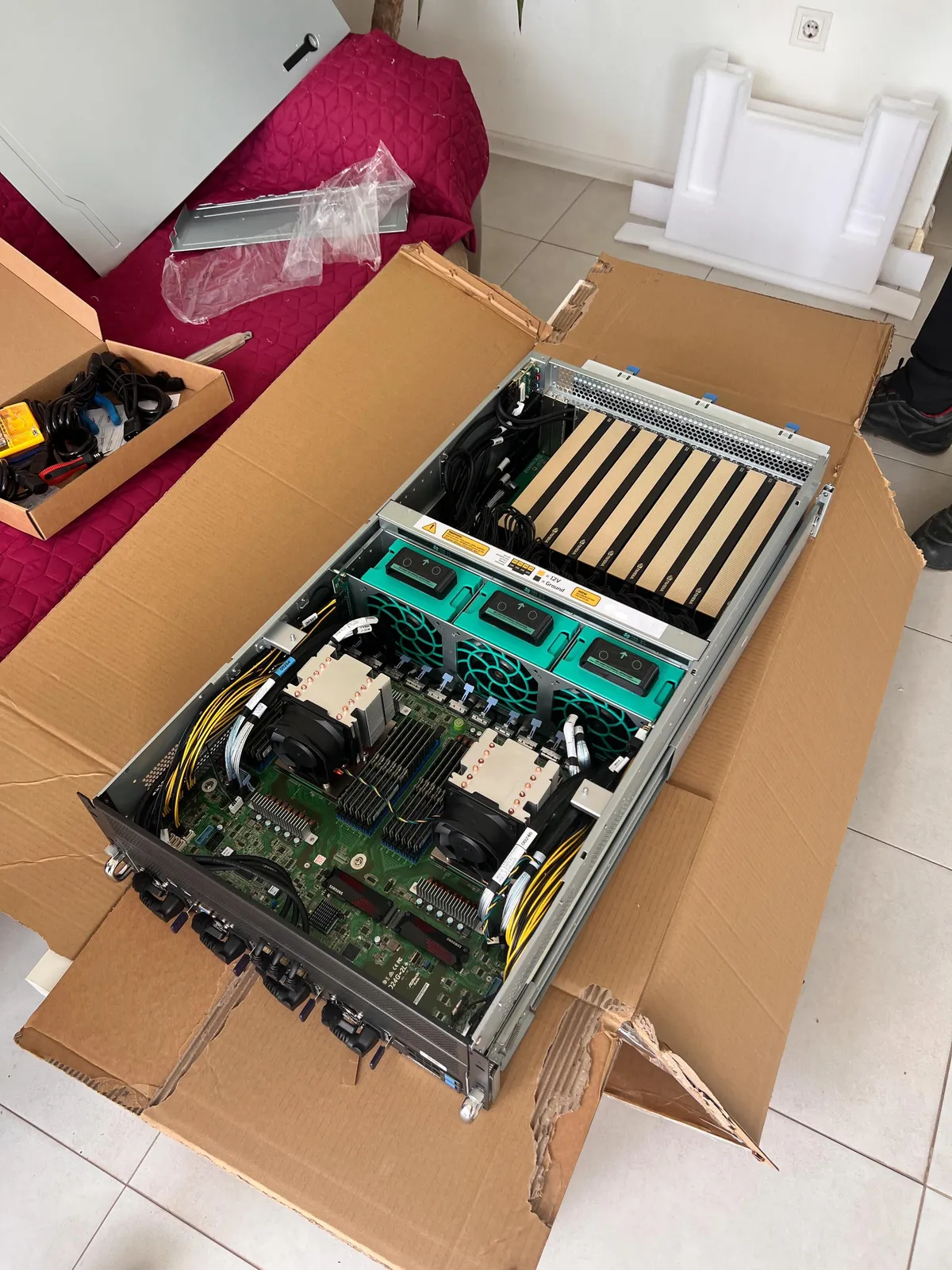
Fully populated: 768 GB of VRAM and 256 CPU cores in four rack units. This exact configuration has been running at NEOXIS since July 2026 and passed Vast.ai verification at 99.8% reliability.
Examples built from our configurator options, as of 6 November 2026. The price comes with the quote, within 3 working days.
What an AI server is, and which businesses need one
An AI server is a rack server built around several GPUs. The cards run the model, two server processors keep them fed with data, and ECC memory and NVMe drives hold models and datasets. For language models it is often called an LLM server. Our 4U-E10G-GENOAX2 is one: four rack units, up to eight GPUs, redundant power and IPMI remote management.
Owning one pays off mainly in three cases:
- Your data has to stay in-house. Personal, medical or financial data often cannot go to just any cloud provider. Under the GDPR it matters where data is processed and who can access it. With your own hardware, in your own rack or in EU colocation, both are clear.
- A model runs all the time. An internal chat, document search, an API for your applications: rented GPUs bill by the hour, while a machine you own costs power, hosting and maintenance once it is paid for.
- You train or fine-tune your own models. On your own hardware, another experiment costs no rent.
If the machine should not sit on your premises, we arrange colocation in an EU data center.
Which model fits which card
Whether a model runs is decided by GPU memory (VRAM), not by compute. The weights alone take the parameter count times the bytes per parameter:
| Model | FP16 / BF16 | INT8 | INT4 |
|---|---|---|---|
| 7B | 14 GB | 7 GB | 3.5 GB |
| 13B | 26 GB | 13 GB | 6.5 GB |
| 34B | 68 GB | 34 GB | 17 GB |
| 70B | 140 GB | 70 GB | 35 GB |
FP16 takes 2 bytes per parameter, INT8 1 byte, INT4 0.5 bytes.
Two more items that estimates tend to leave out:
- KV cache. It grows with context length and the number of concurrent requests. For a 70B-class model it is about 2.6 GB at 8k context and one request, and about 168 GB at 32k context and 16 requests, more than the FP16 weights.
- Overhead. Framework, CUDA context and fragmentation take another 10-15%.
An example: a 70B model at INT8 with 16k context and up to eight concurrent requests needs about 125 GB: 70 GB of weights, about 42 GB of KV cache and about 13 GB of overhead. That does not fit a 96 GB card. At INT4 it is about 90 GB, and that fits.
Whatever does not fit a 96 GB card needs several cards or an H200 NVL with 141 GB. Two 48 GB cards do not replace one 96 GB card, because a split model sends every token across the link between the cards.
When a model fits on both the RTX 5090 and the RTX PRO 6000, the two generate almost equally fast, because both have about 1.8 TB/s of memory bandwidth. The PRO 6000's premium buys capacity, ECC and server cooling. More in our RTX 5090 vs RTX PRO 6000 comparison and the VRAM arithmetic with formulas.
The three configurations side by side
All three are built on the 4U-E10G-GENOAX2: two AMD EPYC 9004 processors, PCIe 5.0 for every card, 24 DIMM slots and 6400 W of redundant power (3+1). They differ in cards, processors and memory:
| Feature | Entry | Mid-range | Large |
|---|---|---|---|
| GPUs | 4× RTX 5090 | 4× RTX PRO 6000 Blackwell | 8× RTX PRO 6000 Blackwell |
| VRAM per card | 32 GB | 96 GB with ECC | 96 GB with ECC |
| Total VRAM | 128 GB | 384 GB | 768 GB |
| Fits per card | 13B at FP16, 32B at INT4 | 70B at INT8 | 70B at INT8 |
| Processors | 2× EPYC 9254 | 2× EPYC 9554 | 2× EPYC 9754 |
| CPU cores | 48 | 128 | 256 |
| Memory, DDR5 ECC | 384 GB | 768 GB | 1.5 TB |
| Memory modules | 24× 16 GB | 24× 32 GB | 24× 64 GB |
| Free GPU slots | 4 | 4 | none |
The first four rows decide which model runs. Processors and memory are sized so the host does not hold the cards back: at least as much memory as VRAM, and all 24 slots filled so every memory channel is in use. The RTX 5090 is the passively cooled server variant from the configurator.
The second platform is the 4U-E10G-ROMEX2: up to ten GPUs on PCIe 4.0, two AMD EPYC 7003 processors and up to 8 TB of DDR4. It fits when cards per euro matter more than PCIe 5.0, for example in inference farms. The “E10G” in both names is not the GPU count: the GENOAX2 takes up to eight.
Buy or rent: utilization decides
The answer hinges on a single number: how many hours a month the GPUs actually work. Our comparison with weekly median rental rates across providers shows that renting wins for irregular use or below about a third of the month. Buying wins when the machine would run most of the time, and the gap widens quickly from there.
Two things shift the arithmetic:
- Idle time. A machine you own does not have to stand still between your jobs. Spare hours can be rented out on marketplaces such as Vast.ai; if you want, we set this up at delivery.
- Growth. Rented capacity grows in minutes, your own in weeks: sourcing, assembly, burn-in, commissioning.
If renting suits you better: NEOXIS AD, in which we hold 5%, offers a private lease of a server with 8× RTX PRO 6000 from $1.70 per GPU-hour, power, cooling, internet and rack included (neoxis.ai). The GPU ROI calculator runs your own case against weekly updated market rates.
What the quote includes
- Sizing for your model. You tell us the model, context length and concurrent users. We check the configuration against the VRAM arithmetic above and explain the reasoning in the quote.
- Assembly and stress test. Our build partner assembles the server and tests it under full load; on request we do it ourselves. Before shipping, all GPUs run at full load together for at least 72 hours, with thermals and power draw logged.
- Warranty. 3 years on all components with email and phone support, 5 years for an extra fee.
- Response times. A first reply within 24 hours, the quote within 3 working days. Monday to Friday, 9:00 AM-6:00 PM Sofia time.
What we have built so far
Eight of them went to one client, each with eight RTX 5090 cards, 64 in total: assembled, tested under full load and put into a data center. The case study of the eight servers shows the configuration and the process.
The ninth, a 4U-E10G-GENOAX2 with eight RTX PRO 6000 Blackwell, belongs to NEOXIS AD, which Aura Digital co-founded with a 5% stake. It matches the large configuration in the comparison above and has been running in colocation near Sofia since July 2026. The NEOXIS project describes how it passed Vast.ai verification.
How buying works
- Configuration. You put together cards, processors, memory and drives in the configurator. Or you describe the model and load, and we propose the configuration.
- Quote. Within 3 working days you get a personalized quote with specification and price.
- Confirmation. We confirm GPU availability before you commit; then you confirm the quote.
- Build and test. Assembly by our build partner, a PCIe topology check and at least 72 hours at full load.
- Delivery. Rack-ready within the EU, with rails and power cables, or straight into colocation.
Related reading
The arithmetic and the data behind the decision – no marketing.
Buying a GPU Server in the EU: Specs, Lead Time, Warranty
A buyer's guide to GPU servers in the EU: why an EU build beats a US import, what to specify, realistic lead times and what to ask of the warranty.
ReadSizing a GPU Server for LLM Inference: the VRAM Maths
How much VRAM a 7B to 70B+ model really needs, why the KV cache is the part everyone forgets, and why memory bandwidth beats TFLOPS for inference.
ReadVast.ai Verification: Data From an 8× RTX PRO 6000
What Vast.ai checks before it lists a GPU server, the numbers a verified 8× RTX PRO 6000 machine reports, and how to compute income with a formula.
ReadWhich configuration does your model need?
Build the server in the configurator, or tell us the model and the load. The quote arrives within 3 working days.